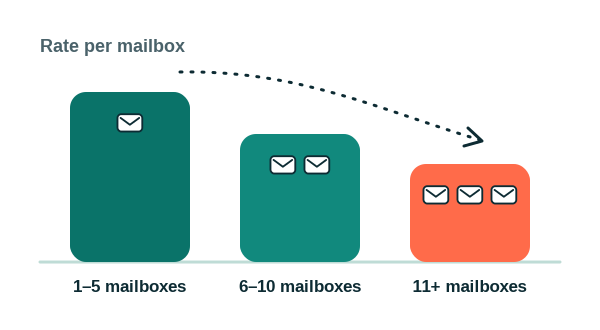
Pricing is per mailbox, and each mailbox’s price includes its email and Drive data. These are our current tiers, as estimates:
- 1–5 mailboxes: $150 each
- 6–10 mailboxes: $100 each
- 11 or more mailboxes: $85 each
Migrations from an on-premise server, such as Exchange, carry a flat $1,000 add-on because of the extra complexity. Shared mailboxes, such as sales@ or office@, are billed at the same per-mailbox rate.
The whole order is priced at one tier: the one that matches your total number of mailboxes. Your price is confirmed in a written quote after we’ve looked at your setup. You get a written quote that says what’s included before any work starts.
How is a migration quote built?
1. A short conversation
You tell us how many people you have, what you use today, and where you want to end up. A call or our quote request form both work.
2. A look at your setup
With your permission, we review the details that change the work: shared mailboxes, total data and the largest mailboxes, shared drives and how they’re shared, domains and who manages DNS. If you’re not sure of something, we help you find it.
3. A written quote
The quote lists what’s moving, where it’s going, what’s included and what isn’t. It also lists anything that won’t transfer automatically and how we’ll handle it, so there are no surprises later.
What we check before confirming your price
Your mailbox count sets the tier. Before we confirm it in writing, we check the details that shape the work. Our guide on how much an email migration costs explains each one in more detail.
- Number of mailboxes, including shared and former-employee mailboxes
- Total data, and any very large mailboxes
- Source and destination, for example Google Workspace to Microsoft 365
- Shared drives, SharePoint sites and permissions (see Google Drive to OneDrive and SharePoint and OneDrive and SharePoint to Google Drive)
- Number of domains and aliases
- Device and sign-in setup done for your staff, or a guide they follow themselves
- How much support you want after the move
What every migration includes
- A written plan that says where each mailbox, drive and folder goes, and what won’t transfer
- Account setup on the new system before any data is copied
- Copying the mail, calendars, contacts and files in the agreed scope, with later passes to pick up changes
- DNS and mail record changes when email is part of the move
- A pilot with a few users or one shared drive before everyone moves
- Checks after each batch, using the migration reports, item counts and spot checks
- A plain guide for staff on what changes for them on cutover day
- Support after the move, for the period set out in your quote
What isn’t included
- Microsoft 365 or Google Workspace licenses, which are billed by Microsoft or Google
- Ongoing IT support after the agreed support period. If you want that, BizTechPro offers managed IT separately; see biztechpro.net.
Who you’re working with
Email Switch Pros is a BizTechPro service. BizTechPro is a Microsoft Partner, based in Pearl River, NY, and in business since 2008. We work with businesses anywhere in the US, remotely.
Frequently asked questions
How much does an email migration cost?
Pricing is per mailbox, in three tiers: 1–5 mailboxes, 6–10 mailboxes, and 11 or more. The whole order is priced at the one tier that matches your total mailbox count, and the per-mailbox price is lower in each larger tier. The current prices are listed on this page. They're estimates, and your price is confirmed in a written quote.
Is the quote in writing?
Yes. You get a written quote that lists what's moving, what's included and what isn't, before any work starts.
Are licenses part of the quote?
No. Microsoft 365 and Google Workspace licenses are a separate cost set by Microsoft or Google. We'll help you pick the plan that fits.
What happens if we find more data partway through?
We'll tell you before doing anything outside the agreed scope, and explain what it changes. Nothing is added to your bill without your OK.