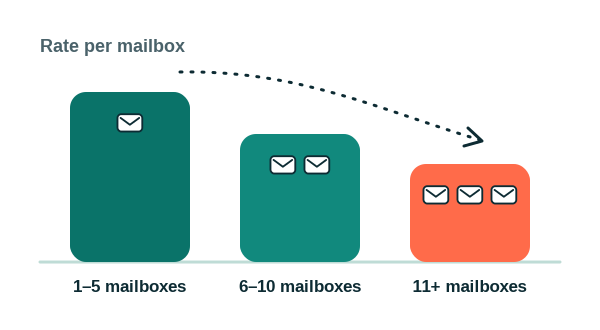
The cost of an email migration starts with how many mailboxes you’re moving. Our price is per mailbox, and it includes each mailbox’s email and Drive data. There are three tiers. The whole order is priced at one tier, and the figures are estimates until we confirm them in a written quote:
- 1–5 mailboxes: $150 each
- 6–10 mailboxes: $100 each
- 11 or more mailboxes: $85 each
Migrations from an on-premise server, such as Exchange, carry a flat $1,000 add-on because of the extra complexity. Shared mailboxes, such as sales@ or office@, are billed at the same per-mailbox rate.
The whole order is priced at one tier: the one that matches your total number of mailboxes. Our pricing page has a calculator for an estimate. The rest of this guide covers the other things that shape a migration, so you know what to check before you call.
Why does the rest of your setup matter?
Moving the email itself is only part of the job. Microsoft’s own instructions for a Google Workspace migration require every user to be set up in Microsoft 365 before any mail is copied, and the domain’s mail records changed afterward. Around that sit file moves, permissions, phones, laptops and the questions that come in on the first morning. Some businesses need almost none of that. Others need all of it. That’s why we look at your setup before we confirm your estimate in writing. Here’s what we look at.
1. How many mailboxes are moving?
The number of people is the starting point, but not the whole story. Count these too:
- Shared mailboxes, such as sales@ or office@, that several people read
- Former employees’ mailboxes you need to keep but nobody signs in to
- Distribution lists and groups, which have to be rebuilt on the new side
A business with ten staff and fifteen extra mailboxes has more work than its headcount suggests.
2. How much data is there?
More data takes more time to copy and check. Two sizes matter: the total, and the biggest single mailbox. Microsoft notes that mailboxes over 100 GB need a different method when moving from Google, and that the largest single message that moves is limited by your mail settings. A few very large mailboxes can shape the whole project.
If you’re not sure how much you have, the admin console for your current system usually shows storage per user. A rough figure is enough for a first quote.
3. Where are you moving from, and to?
The direction changes the work. Google Workspace to Microsoft 365, Microsoft 365 to Google Workspace, and moves from older hosted email each have their own steps and their own limits. Both Microsoft and Google publish separate instructions and limitations for each source. A move from a web host’s basic email is a good example: Microsoft’s standard method for those (IMAP) copies mail folders only, not contacts or calendars, so those need a separate step.
4. Files, shared drives and permissions
For many businesses, files are the bigger half of the job. What adds work:
- Shared drives or SharePoint sites that whole teams depend on
- Permissions that need to come across accurately, not just the files
- Sharing with clients and vendors, because links to outside people often have to be rebuilt by hand
- File history, if you need older versions kept and not just the latest copy
Both directions have their own rules here. Microsoft, for instance, leaves file-level permission copying off by default and doesn’t recreate sharing links to outsiders. Google maps OneDrive and SharePoint access levels onto its own roles, and keeps only one sharing link per file. Our pages on Google Drive to OneDrive and SharePoint and OneDrive and SharePoint to Google Drive migration explain these in plain English.
5. How many domains do you use?
One domain is the simple case. Extra domains, email aliases, and domains whose DNS is managed by a web designer who’s hard to reach all add steps. It also matters whether you can sign in to your domain registrar today. If nobody has that login, recovering it becomes part of the project.
6. Devices and sign-in setup
After the cutover, every person signs in to a new account. That means:
- Setting up two-step sign-in
- Adding the account to Outlook or a browser on each computer
- Updating phones and tablets
- Swapping desktop file sync from one service to the other
Some teams handle this themselves with a written guide. Others want it done for them, person by person. The quote reflects which you choose.
7. Licensing
You’ll need the right Microsoft 365 or Google Workspace plan on the new side before anything moves. Licenses are a separate cost from the migration work, set by Microsoft or Google and billed for as long as you use the service. Part of planning is matching plans to what people actually need, and noting the date your old subscription renews, so you aren’t paying for two systems longer than necessary.
8. Support after the move
The first days on a new system tend to bring questions: a missing folder, a phone that stopped syncing, a rule that needs turning back on. How much after-move support you want, and for how long, is part of the quote, so ask every provider what theirs includes.
What to have ready when you ask for a quote
You’ll get a faster and more accurate quote with these five answers:
- How many people, plus shared and former-employee mailboxes
- Where email and files live now, and where you want them
- Rough total data size, and your largest mailbox if you know it
- How many domains you use, and who controls your DNS
- Whether you want device setup done for you or a guide for staff
Questions to ask any migration provider
Whoever you hire, ask these before you sign:
- What exactly is included, and what costs extra?
- What won’t transfer, and how will you handle each item?
- Who changes the DNS records, and when?
- Will you test with a few users first?
- What support do we get after the move, and for how long?
Clear answers in writing make quotes easy to compare.
How we quote
Our pricing page lists the per-mailbox tiers and has a calculator for an estimate. To confirm your price, we ask the questions above, look at your setup and send a written quote that lists what’s included. If you’re moving from Google, see our Google Workspace to Microsoft 365 migration service page.
Email Switch Pros is a BizTechPro service. BizTechPro is a Microsoft Partner, based in Pearl River, NY, and in business since 2008. To talk through your project, request a quote.
Our current prices
| Mailboxes in the order | Price per mailbox |
|---|---|
| 1 to 5 mailboxes | $150 |
| 6 to 10 mailboxes | $100 |
| 11 or more mailboxes | $85 |
The price per mailbox includes that mailbox’s email and Drive data.
Moves from an on-premise server, such as an Exchange server, add a flat $1,000 to the order.
For an estimate for your own mailbox count, use the pricing calculator.
Frequently asked questions
How much does an email migration cost?
Our price is per mailbox, with email and Drive data included, in three tiers: 1–5 mailboxes, 6–10 mailboxes, and 11 or more. The whole order is priced at the one tier that matches your total mailbox count, and the per-mailbox price is lower in each larger tier. The current prices are in the table on this page. They're estimates, and we confirm your price in a written quote once we've looked at your setup.
Is it cheaper to do an email migration ourselves?
It can be, if you have a small, simple setup and someone with time to learn the tools. The work that's easy to underestimate is everything around the copy: DNS changes, permissions, devices, sign-in and the clean-up afterward. Ask yourself who will handle those when staff need help.
Are Microsoft 365 or Google Workspace licenses included in the migration price?
Licenses are a separate cost, set by Microsoft or Google, and they're billed for as long as you use the service. The migration is a one-off project. We'll tell you which plan fits what you need, so you don't pay for features nobody uses.
What does the per-mailbox price include?
Each mailbox's price covers moving that person's email and Drive data. Shared mailboxes are billed at the same per-mailbox rate. Microsoft 365 or Google Workspace licenses aren't included; they're a separate cost billed by Microsoft or Google.
What do you need from us to give a quote?
The number of users, where your email and files are now, where you want them to go, roughly how much data you have and how many domains you use. If you don't know the data size, we can help you find it.